
Power Search4.0.0 - Download
You'll be able to download in few seconds.
Publisher Description
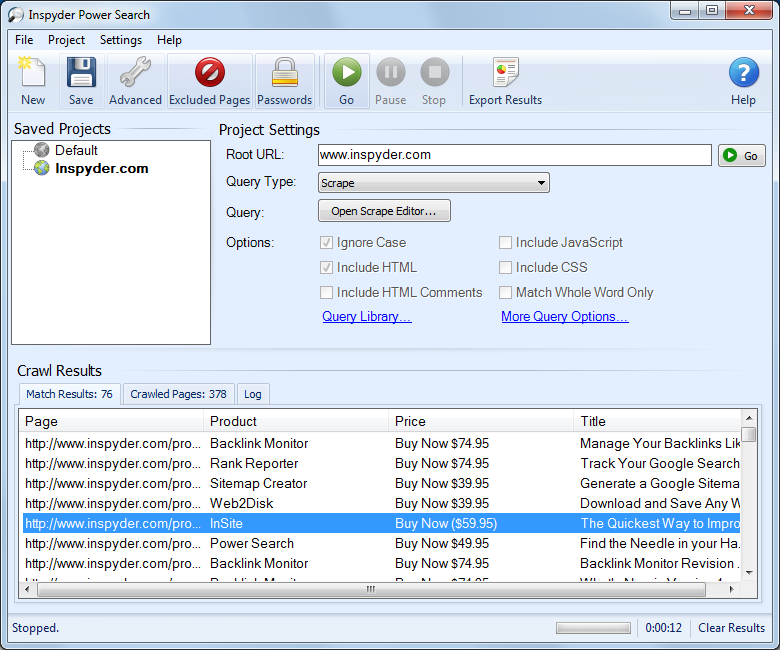
Power Search is a unique tool for searching and scraping data from virtually any website. Power Search's easy to use point-and-click interface will have you scraping websites in no time. Save your captured data to Excel or XML files. Great for data mining and website analysis!
Power Search supports multiple query formats, including basic "Exact Match" searches for finding specific text on your website. This feature is great for finding references to unwanted information such as old files, discontinued products, etc.
For the most complex searches, Power Search supports Regular Expression queries. Enter your regular expression and let Power Search apply your expression to each page it crawls. Perfect for SEO applications. Find missing page titles, extract meta tags, alternate text, and more! Find out which pages need your attention quickly and easily.
Power Search also comes loaded with a predefined set of common queries in the Query Library. Just double click the query you want to use, and Power Search configures itself as necessary. Find and review all the HTML comments on your website in seconds. Just open the query library, select the "HTML Comment" query, and click go! In seconds, your website's hidden text will be extracted and shown to you.
Power Search is a must have for anyone who is serious about website analysis. Don't delay, download a free trial today!
About Power Search
This Automation Tools program is available in English. It was last updated on 29 September, 2026. Power Search is compatible with the following operating systems: Windows.
The company that develops Power Search is Inspyder Software Inc.. The latest version released by its developer is 4.0.0.
The download we have available for Power Search has a file size of 13.6 MB. Just click the green Download button above to start the downloading process. The program is listed on our website since 2012-01-02 and was downloaded 0 times. We have already checked if the download link is safe, however for your own protection we recommend that you scan the downloaded software with your antivirus. Your antivirus may detect the Power Search as malware if the download link is broken.
How to install Power Search on your Windows device:
- Click on the Download button on our website. This will start the download from the website of the developer.
- Once the Power Search is downloaded click on it to start the setup process (assuming you are on a desktop computer).
- When the installation is finished you should be able to see and run the program.
Program Details
System requirements
Download information
Pricing
Version History
version 4.0.0
posted on 2012-01-02
- Redesigned web scraping interface is now easier and faster than ever before!
- Projects can be organized into folders
- Windows 8 compatible
- Automatic pause/resume scraping on Windows sleep/standby
- Web scraping results are now saved with the project
- New command line options
version 1.0
posted on 2001-08-16
[First release]
Disclaimer
External Download
We do not host Power Search on our servers. We did not scan it for viruses, adware, spyware or other type of malware. This app is hosted by the software publisher and passed their terms and conditions to be listed there. We recommend caution when installing it.
The external download link for Power Search is provided to you by apps112.com without any warranties, representations or guarantees of any kind, so access it at your own risk.
If you have questions regarding this particular app contact the publisher directly. For questions about the functionalities of apps112.com contact us.
